


My Account

Cart Check Out
International Point of Sale International Point of Sale
[ Home ] [ Software ] [ Hardware ] [ Complete Systems ] [ About Us ] [ Download ] [ Free Quote ]
Products
>> Barcode Scanners
>> Card Swipers
>> Cash Drawers
>> Cash Registers
>> Check Readers
>> Complete POS
>> Keyboards
>> Label Printers
>> Labels
>> Pole Displays
>> Portable Terminals
>> Posiflex Jiva
>> Price Checkers
>> Printheads
>> Receipt Printers
>> RFID Printers
>> Ribbons
>> Signature Pads
>> Touchscreens
News
  Check out the full article library
 

5.31.2006


Restaurant Pro Express is used by employees
POS Solution for Restaurants

Read more articles.....


12.23.2004


Liquor POS system
Liquor Store Point of Sale Solution

Read more articles.....


3.20.2005


C-Store POS system
The Best Convenience Store POS

Read more articles.....


04.01.2004


Labels, Ribbons, and Printheads available for printers
Labels, Ribbons, and Printheads

Read more articles.....


02.13.2004


All makes of barcoder readers available
Barcode Scanners 101

Read more articles.....


10.15.2004


Symbol SPT1550 pocket data register and terminal
Choosing a portable Point of Sale System

Read more articles.....


International Point of Sale brings you the best in POS hardware and software, all at an affordable price. Any type of retail store can benefit from our wide selection of products designed to make your business more profitable. We have dedicated service professionals available day and night to take care of your business needs."


Library
 

Friendly Printer Setup

1. The first thing you will have to do is make sure you have print drivers installed for each printer and test them to make sure they are printing correctly in windows. If you are not able to print a test page in windows you will not be able to print in CRE/RPE.

2. Menu screen with Friendly printer setup selected Now that you have your drivers installed you can get your printers setup in CRE/RPE. You must get to the Friendly Printer Setup screen in order to do this.
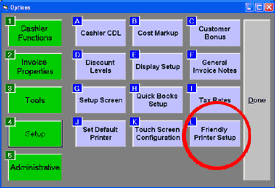
3. Once you are in the Friendly Printer Setup Screen you are ready to link the printers with their corresponding drivers.

4. All you have to do, is highlight the friendly printer on the left hand side and highlight the correct print driver on the right hand side. Then select the printer type on the bottom right. When you are finished remember to click on the "EXIT" button, this will update and save your changes.
NOTE: The local windows printers shown in the picture will be different from the ones on your computer.
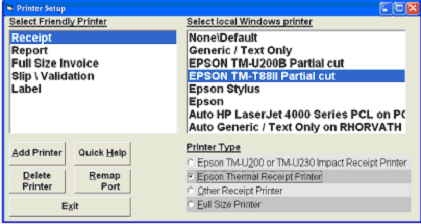
printer setup page

5. If you need any further help you can always choose the quick help feature on the bottom left of the friendly printer screen.

6. If you need to setup Remote or Kitchen printers go on to Part 2.

Part Two: Setup for Remote or Kitchen Printers


Return to the POS library.


Contact Us for the Best Deals Anywhere: 1-866-468-5767

 

Home | Articles | POS Software | POS Hardware | Complete Systems | About Us | Download

POS Software | Receipt Printer | Barcode Scanner | Pole Display | Inventory Management
Credit Card Swiper | Cash Drawer | Label Printing | Portable Terminal
Site Map 2 3 full
sales@internationalpointofsale.com


© 2006 International Point of Sale 1-866-468-5767 or 201-928-0222