


My Account

Cart Check Out
International Point of Sale International Point of Sale
[ Home ] [ Software ] [ Hardware ] [ Complete Systems ] [ About Us ] [ Download ] [ Free Quote ]
Products
>> Barcode Scanners
>> Card Swipers
>> Cash Drawers
>> Cash Registers
>> Check Readers
>> Complete POS
>> Keyboards
>> Label Printers
>> Labels
>> Pole Displays
>> Portable Terminals
>> Posiflex Jiva
>> Price Checkers
>> Printheads
>> Receipt Printers
>> RFID Printers
>> Ribbons
>> Signature Pads
>> Touchscreens
News
  Check out the full article library
 

5.31.2006


Restaurant Pro Express is used by employees
POS Solution for Restaurants

Read more articles.....


7.07.2005


Swiping a barcode with a laser scanner
Home Decor Store computerizes with CRE

Read more articles.....


12.23.2004


Liquor POS system
Liquor Store Point of Sale Solution

Read more articles.....


3.20.2005


C-Store POS system
The Best Convenience Store POS

Read more articles.....


05.19.2004


Cash Register Express Screenshot of register
CRE Version 10.5 is out!
 

04.01.2004


Labels, Ribbons, and Printheads available for printers
Labels, Ribbons, and Printheads

Read more articles.....


02.13.2004


All makes of barcoder readers available
Barcode Scanners 101

Read more articles.....


10.15.2004


Symbol SPT1550 pocket data register and terminal
Choosing a portable Point of Sale System

Read more articles.....

  10.07.2004  
 
How much should a POS computer system cost?
How much should you spend on a POS system?
Read more articles.....
1
Features and Benefits


International Point of Sale brings you the best in POS hardware and software, all at an affordable price. Any type of retail store can benefit from our wide selection of products designed to make your business more profitable. We have dedicated service professionals available day and night to take care of your business needs."


Library
 

Install a Logic Controls USB Pole Display in Cash Register Express

These instructions will give you step by step instructions on how to set up your pole display using Windows XP. You must have administrator access in Windows XP to install new hardware Setting up a USB pole display
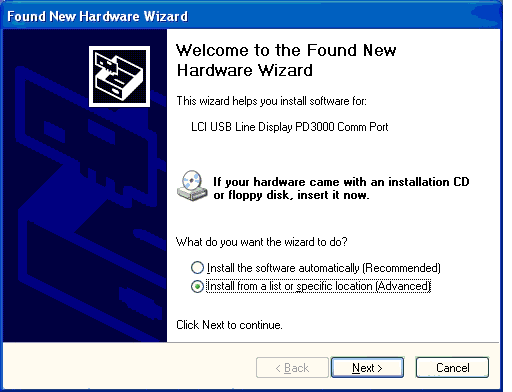

USB / Virtual COM Port driver Installation:

1. Plug the Pole Display's USB cable into your computer.

2. Windows will automatically detect that new hardware has been plugged into the computer.

3. Choose to install from a list or specific location, then click Next.
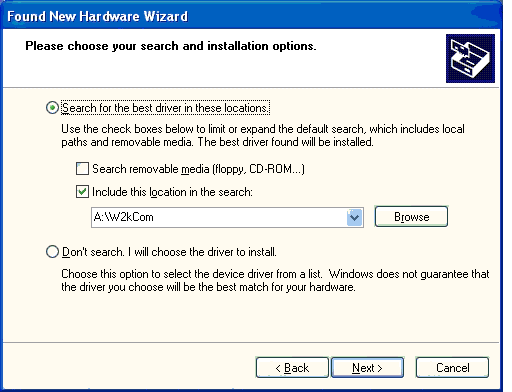
Found new hardware screen on logic controls pole display setup

4. Insert the driver disk that came with your pole display and click on Search for the Best Driver. There are 2 folders on the floppy, so make sure you either browse or type in the path to the W2kCom (Virtual Com Port Driver) folder on the A:\ drive. Then click Next.
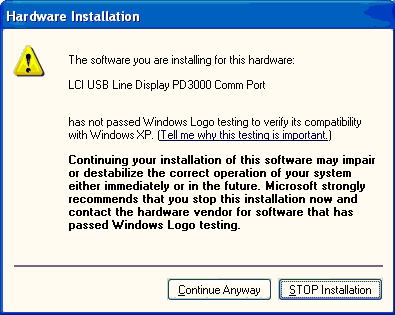
Found new hardware wizard

5. Click Continue Anyway, and the installation will complete automatically.

6. After the installation is complete, right-click the mouse on the My Computer icon either on your desktop or in your Start menu, then right-click on Properties.

7. Click on the Hardware tab at the top of the next window, then click on Device Manager.
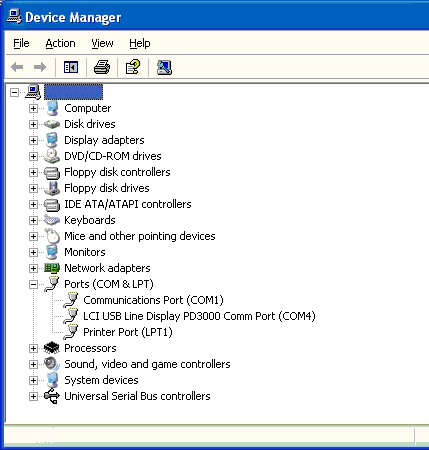
Device Manager on POS software setup screen

8. Click on the Plus symbol next to where it says Ports and look for the LCI USB Line Display PD3000 Comm Port or similar entry in the list. Take note of what Com Port it says there. In this example, COM4 is selected.

9. Click the X in the upper right-hand corner of the window to close the Device Manager. 10. Start the Cash Register Express or Restaurant Pro Express program. 11. From the Login screen, click on File, then Setup Screen and type in the Administrator password.
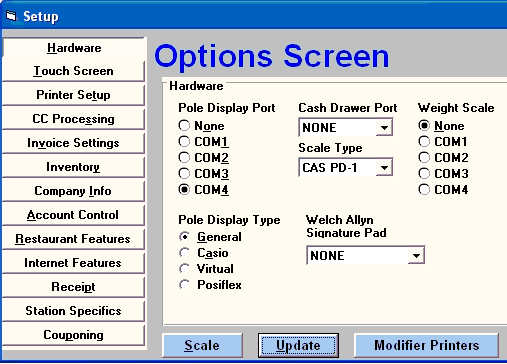
Option Screen for POS software 12. On the Hardware Screen, click on the COM port that the USB Line Display was set to in the Device Manager, then click Update at the bottom of the screen to save your changes.

13. Now login to CRE/RPE and enter an item onto the Invoice and check the Pole Display, it should show the item you just rang up.

Your USB Pole Display is now setup and ready to be used.


Return to the POS library.


Contact Us for the Best Deals Anywhere: 1-866-468-5767

 

Home | Articles | POS Software | POS Hardware | Complete Systems | About Us | Download

POS Software | Receipt Printer | Barcode Scanner | Pole Display | Inventory Management
Credit Card Swiper | Cash Drawer | Label Printing | Portable Terminal
Site Map 2 3 full
sales@internationalpointofsale.com


© 2006 International Point of Sale 1-866-468-5767 or 201-928-0222