


My Account

Cart Check Out
International Point of Sale International Point of Sale
[ Home ] [ Software ] [ Hardware ] [ Complete Systems ] [ About Us ] [ Download ] [ Free Quote ]
Products
>> Barcode Scanners
>> Card Swipers
>> Cash Drawers
>> Cash Registers
>> Check Readers
>> Complete POS
>> Keyboards
>> Label Printers
>> Labels
>> Pole Displays
>> Portable Terminals
>> Posiflex Jiva
>> Price Checkers
>> Printheads
>> Receipt Printers
>> RFID Printers
>> Ribbons
>> Signature Pads
>> Touchscreens
News
  Check out the full article library
 

5.31.2006


Restaurant Pro Express is used by employees
POS Solution for Restaurants

Read more articles.....


7.07.2005


Swiping a barcode with a laser scanner
Home Decor Store computerizes with CRE

Read more articles.....


12.23.2004


Liquor POS system
Liquor Store Point of Sale Solution

Read more articles.....


3.20.2005


C-Store POS system
The Best Convenience Store POS

Read more articles.....


04.01.2004


Labels, Ribbons, and Printheads available for printers
Labels, Ribbons, and Printheads

Read more articles.....


02.13.2004


All makes of barcoder readers available
Barcode Scanners 101

Read more articles.....


10.15.2004


Symbol SPT1550 pocket data register and terminal
Choosing a portable Point of Sale System

Read more articles.....

Features & Benefits


International Point of Sale brings you the best in POS hardware and software, all at an affordable price. Any type of retail store can benefit from our wide selection of products designed to make your business more profitable. We have dedicated service professionals available day and night to take care of your business needs.


Library
 

Add a Customer

Keeping track of your customer is a great way of increasing customer loyalty. You can have special sales aimed at specific customer, create customer cards, write emails and mailings, and much more. Adding a customer to Cash Register Express is simple and takes hardly any time. If you have any questions give us a call (866) 468-5767.

1. To add a customer, click on the Customer button on the bottom of the screen or press F4.
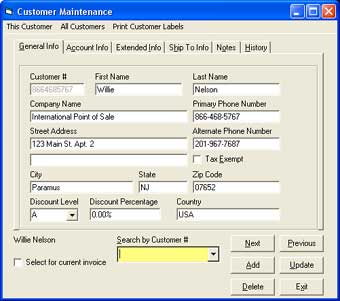
Photo of Add a Customer screen that allows you to add a customer in Cash Register Express 2. Click on Add.

3. Assign a Customer Number. The best way to do this is to use a customer's phone number.

4. Move to the First Name field. Type Willie.

5. Move to the Last Name field. Type Nelson.

6. Move to the Company Name field. Type International Point of Sale.

7. Move the cursor to the Primary Phone Number field. Type 866-468-5767

8. Move the cursor to the Street Address field. Type 123 Main St Apt. 2

9. Move to the Alternate Phone Number field. Type 201-967-7687.

10. Move to the City field. Type Paramus.

11. Move to the State field. Type NJ.

12. Move to the Zip Code field. Type 07652.

13. Click on the arrow next to the Discount Level field and Choose B.

14. Move to the Discount Percentage field. Type 0.

15. Move to the Country field. Type USA.

16. Click on Save. You have just entered the basic customer information other information can be added later. Note: You do not have to enter customers information, the default will always be a cash customer.

Now that you've added a customer into your database go to the final step of the tutorial: Process a Cash Transaction

Step 4: Add a Department
Step 5: Add a Vendor
Step 6: Add an Inventory Item
Step 7: Add a Customer
Step 8: Process a Cash Transaction
Return to main tutorial screen


Return to the POS library.


Contact Us for the Best Deals Anywhere: 1-866-468-5767

 

Home | Articles | POS Software | POS Hardware | Complete Systems | About Us | Download

POS Software | Receipt Printer | Barcode Scanner | Pole Display | Inventory Management
Credit Card Swiper | Cash Drawer | Label Printing | Portable Terminal
Site Map 2 3 full
sales@internationalpointofsale.com


© 2006 International Point of Sale 1-866-468-5767 or 201-928-0222