


Process a Cash Transaction
Solve any Cash Register Express related questions on our forum
Processing a transaction is one of the most important functions a pos software. Try this tutorial with Cash Register Express (CRE) and see how easy it is to process a transaction and how easy it is to teach to your employess. You will end up saving time and money by having quick and accurate transactions occuring at each of your stations while keeping count your inventory. If you have any questions call (866) 468-5767 for more help.
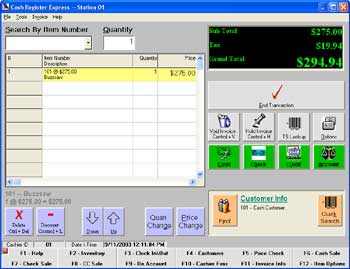
1. On main CRE invoice page the cursor should start in the Search by Item Number field.
2. Find the Item:
If you had a barcode scanner running, you can scan an item now and it would appear in the Search by Item Number field. This would automatically put the item in the list of items about to be purchased. If you do not have a barcode scanner running click on the drop down menu and select the item that you wish to be purchased.
 3. Find the Customer:
This step is not required. Keeping track of your customer is a great way to improve customer loyalty and increase sales but you do not need to look up a customer. In the middle of the screen there is a Customer Find button, click this or press Alt-i. Type in the customer's number, most people use a customer's phone number as a customer number. Once you type this in the requested customer should appear. Press Select.
4. On the main invoice screen select the large End Transaction button that is on the right side of the screen.
5. A screen will appear that lets you choose if the customer would like to pay in cash, credit cards, on account, gift card, or debit card. We will finish this transaction as if the exact amount of cash was given. Press OK. Congratulations, you've just completed a cash transaction using Cash Register Express as a pos software.
Feel free to review other parts of this tutorial otherwise return to the cre page. If you have any question, comments, or would like a personal walk through of CRE call one of our knowledgable represantives at (866) 468-5767.
Step 4: Add a Department
Step 5: Add a Vendor
Step 6: Add an Inventory Item
Step 7: Add a Customer
Step 8: Process a Cash Transaction
Return to main tutorial screen
Return to the POS library.
Contact Us for the Best Deals Anywhere: 1-866-468-5767
